Introduction — Hands-free control, made simple
Hands-free apps are quietly delightful: say a word and your program wakes, listens, and acts. lsHotword is my (Hemant’s) small, pragmatic contribution to that space — an open, MIT-licensed Python toolkit that helps you train, test, and run custom wake-word detectors locally. It’s designed to be approachable: CLI tools, an optional GUI trainer, and a workflow that mirrors the classic “collect positives/negatives/background → generate examples → train → test” pipeline. If you want a no-friction way to add a wake-word to a hobby assistant, prototype, or IoT project, lsHotword is worth a look. ([GitHub][1])
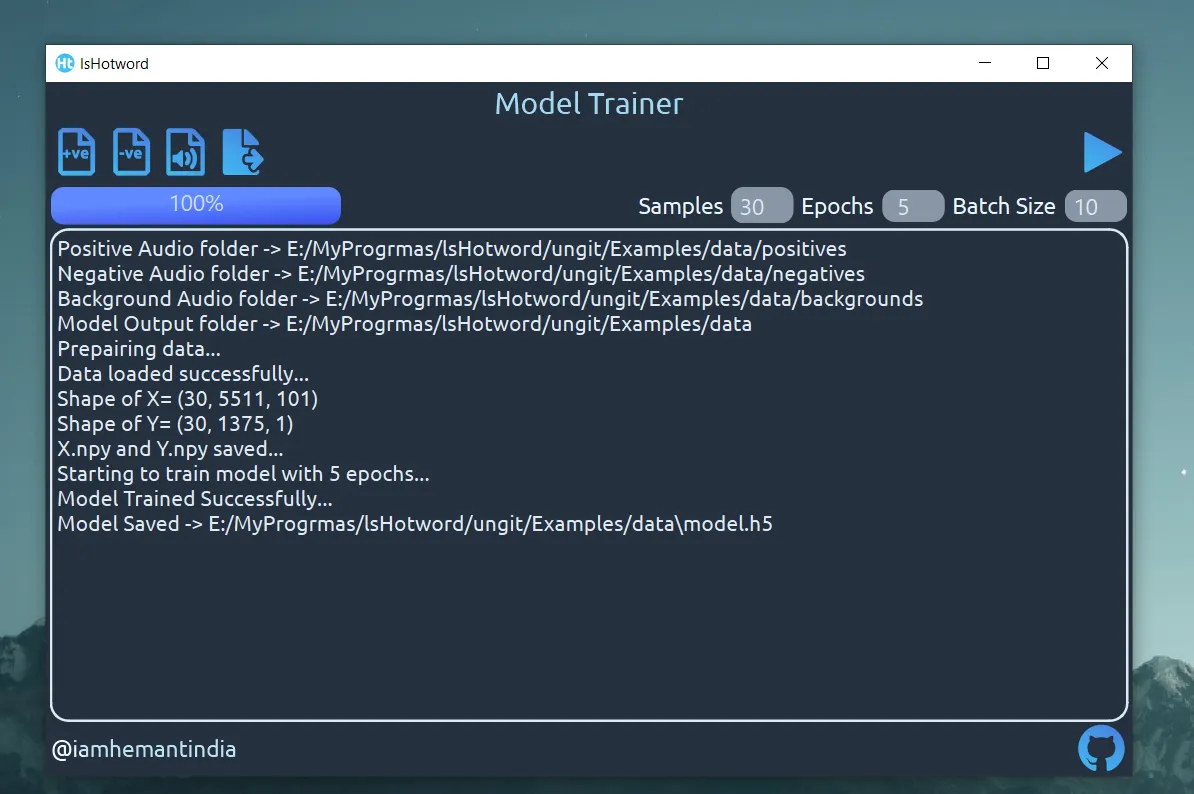
Figure 1 — Project UI trainer screenshot.
Trainer snapshot — what training looks like
The GUI trainer provides a quick, visual way to assemble data, run short experiments and save a trained model. Below is a short run where the trainer prepared data and saved a model.h5 file — a concrete example of the workflow you’ll replicate when following this post.
What lsHotword actually does (short and sweet)
Warning: This project has not been actively updated for some time due to my busy schedule. Some dependencies, tooling, or examples may be out of date. I plan to do a major rewrite in the future that adopts newer architectures and tools which have emerged since the last update. If you intend to use lsHotword for production work today, treat it as experimental and check the GitHub repo for the latest notes or issues.
What lsHotword actually does (short and sweet)
- Lets you train a custom wake-word model from your own audio examples. ([GitHub][1])
- Provides both a GUI trainer (for convenience) and CLI tools for data generation, training and live testing (
lshUITrainer,lsHDatagen,lsHTrainer,lsHTestModel). ([GitHub][1]) - Runs locally on Windows / Linux / Mac — no cloud required, so privacy and offline use are straightforward. ([GitHub][1])
Why you might pick lsHotword
If you’ve ever tried to cobble together a wake-word system, you’ll appreciate simplicity. lsHotword gives you:
- A low barrier to entry:
pip install lsHotword --upgradegets you started, and the README walks through the dataset layout and commands. ([pydigger.com][2]) - A GUI trainer for people who prefer point-and-click over CLI flags — useful when assembling training data or experimenting with epochs/batch size. ([GitHub][1])
- An educational workflow: the project explicitly follows the deep-learning-course style pipeline (positives, negatives, background noise → synthetic example generation → model training), which is great if you want to learn the steps behind wake-word systems. ([GitHub][1])
Quick developer snapshot — how it feels to use
- Record example audio: a small set of positives (your wake word spoken several times), negatives (similar-sounding but non-activate phrases), and a couple of background noise files. The README recommends 44.1 kHz audio and a simple directory layout. ([GitHub][1])
- Launch the GUI trainer with
lshUITrainer, import folders, pick epochs and batch size, and hit Train — the GUI will produce amodel.h5you can ship with your app. ([GitHub][1]) - Or: generate training examples with
lsHDatagen, train withlsHTrainer --inX X.npy --inY Y.npy, then test live usinglsHTestModel --model ./model.h5. A live run prints<< Waiting for Hotword >>and plays a chime when detected. ([pydigger.com][2])
Example (paraphrased) usage inside your Python app:
from lsHotword.ls import Hotword

hotword = Hotword("./model.h5")
if hotword.HotwordLoop():
    print("Wake word detected!")
(README provides the tested flow — this snippet shows how minimal integration can be.) ([GitHub][1])
Where this fits in the ecosystem (and a quick comparison)
There are mature, commercial or research-grade alternatives — e.g., Picovoice Porcupine — that focus on production robustness and offer pre-built models and commercial tooling. If you need enterprise-grade accuracy across accents, noisy cars, and millions of devices, consider those options. But if your goal is a small, offline, learnable wake-word pipeline for prototypes, educational projects, hobbyist assistants or one-off tools, lsHotword is a practical, transparent choice. Porcupine is a useful comparison if you later outgrow a simple local model. ([Picovoice][3])
Practical tips & honest caveats
- Data quality matters more than model size. The README’s training recipe (positives / negatives / background + augmentation/synthesis) is a solid starting point — but expect to iterate: more varied positives and realistic background samples will improve detection. ([GitHub][1])
- Sample rate & preprocessing: the project recommends 44.1 kHz audio or converting with FFmpeg. Inconsistent sample rates can hurt performance unless you preprocess carefully. ([GitHub][1])
- Not a one-click enterprise solution: lsHotword is intentionally simple. If you need automatic model updates, accent-robust datasets, or mobile/embedded delivery at scale, you’ll need extra engineering or a commercial engine. ([Picovoice][3])
- Local inference = privacy & offline operation: because it runs on-device, user audio stays local — a big plus for hobby projects and privacy-aware applications. ([GitHub][1])
Real use-cases where lsHotword shines
- Personal voice assistants on a Raspberry Pi or small desktop agent.
- Prototyping a voice-activated utility (e.g., “hey lights” toggle for home automation).
- Teaching workshops or coursework on keyword spotting (the code and GUI are easy to demo).
- Hobby robotics where an always-listening tiny classifier is useful and privacy is essential.
How to get started
- Install:
pip install lsHotword --upgrade. ([pydigger.com][2]) - Repo & docs: the GitHub README contains examples, sample data, GUI screenshots and contact details. Dive into
/Examples/datato see the expected audio layout. ([GitHub][1])
Want to contribute or improve it?
If you find value in lsHotword, small ways to help the project are:
- Try the trainer with your voice and report edge cases (noise types, accents, false triggers).
- Improve documentation or add example notebooks for training and evaluation.
- Add CI-tested examples for different platforms, or a light mobile wrapper for easy deployment.
Links & sources
- lsHotword (GitHub README and code) — primary project page and instructions. ([GitHub][1])
- PyPI metadata (version 1.2.4, upload time and package details). ([pydigger.com][2])
- Picovoice Porcupine — an example of a production wake-word engine to compare against. Useful when planning to scale or require higher robustness. ([Picovoice][3])